
Building and interacting with modern AI assistants like Claude requires more than writing good prompts—it demands an understanding of context budget management, skill architectures, and underlying model trade-offs.
When working with Claude (via Claude.ai, Claude Code CLI, or the Anthropic API), inefficient usage leads to context window exhaustion, high latency spikes, and escalating operating costs.
1. Demystifying Models vs. Agentic Skills
To optimize your developer workflow, you must distinguish between Models (the computational engines) and Skills / Tools (the dynamic execution interfaces).
Understanding Claude Models
Models represent the underlying Large Language Model (LLM) weights powering your requests. Selecting the right model sets your baseline for reasoning quality, response speed, and cost-per-token.
| Model Tier | Ideal Use Case | Relative Cost | Content Window |
|---|---|---|---|
| Claude 3.5 / 3.7 Sonnet | General coding, complex reasoning, agentic tasks, architecture design | Balanced (Medium) | 200,000+ Tokens |
| Claude 3 / 3.5 Haiku | Lightweight tasks, quick classification, log parsing, high-throughput pipelines | Extremely Low | 200,000 Tokens |
| Claude Opus | Deep research, multi-step logical synthesis, complex mathematical proofs | High | 200,000+ Tokens |
What Are Claude Skills and Tools?
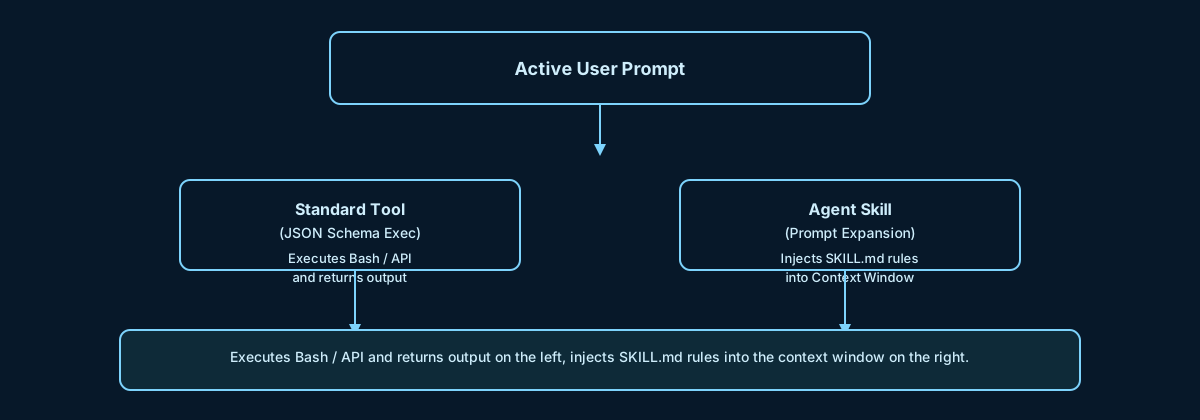
While a model provides static knowledge, Skills and Tools grant dynamic agency to the assistant:
Tools (Function Calling): Explicit programmatic interfaces (e.g., bash, text_editor, web_search) defined via standard JSON schemas. Claude emits a structured call, and an environment executes it.
Skills (Prompt-Based Meta-Tools): Specialized instruction sets (typically packaged inside markdown files like SKILL.md). Rather than executing raw code directly, a Skill expands on demand to inject task-specific guidelines, formatting rules, or operational constraints directly into Claude’s active context window.
2. Practical Strategies to Save Tokens
Token efficiency directly impacts context freshness and API costs. Here are actionable techniques to maximize your token budget:
A. Leverage Prompt Caching
When using the Anthropic API or Claude interface, enable Prompt Caching for static assets such as system prompts, large codebase context, or base tool definitions. Cached tokens are significantly cheaper and reduce latency dramatically.
B. Modularize Instructions
Avoid pasting massive monolithic instruction sets into every turn. Break instructions into modular, on-demand skills that only load when triggered by specific task requirements.
C. Restrict Output Verbosity
System Instruction: Output raw JSON only. Do not wrap responses in markdown formatting or explanatory text.
D. Clear History & Truncate Sessions
In CLI workflows (such as Claude Code) or API loops, running long multi-turn sessions accumulates historical messages. Regularly clearing memory (e.g., /compact or /clear) resets the input context before irrelevant history drains your context limit.
3. Deep Diagnosis: How Active Connectors & Skills Consume Tokens in the Background
A common issue developers encounter is Phantom Token Drain—where input token usage reaches tens of thousands of tokens before a single line of user prompt is processed. This occurs because of how Model Context Protocol (MCP) Connectors, Tools, and Agent Skills inject themselves into the context payload.
┌──────────────────────────────────────────────────────────────────┐
│ TOTAL INPUT CONTEXT WINDOW │
├──────────────────────────────────────────────────────────────────┤
│ 1. System Instructions & Scaffolding │
├──────────────────────────────────────────────────────────────────┤
│ 2. Tool Definitions (JSON Schemas for Bash, Read, File Edit) │
├──────────────────────────────────────────────────────────────────┤
│ 3. Active MCP Connectors (Database, GitHub, Slack Schemas) │
├──────────────────────────────────────────────────────────────────┤
│ 4. Loaded Agent Skills (Expanded SKILL.md Files) │
├──────────────────────────────────────────────────────────────────┤
│ 5. Actual User Prompt: "Fix the bug on line 42" │
└──────────────────────────────────────────────────────────────────┘
1. Schema Overhead from MCP Connectors
When you hook up Model Context Protocol (MCP) servers (e.g., Postgres, GitHub, JIRA, Sentry), every active connector adds its entire schema, endpoint descriptions, and parameter definitions directly into system parameters. A few connected tools can inject 5,000 to 30,000+ background tokens per turn regardless of whether the query requires those tools.
2. Base Tool System Scaffolding
Tool-enabled environments insert a default system message instructing Claude how to construct function calls, handle tool results, and retry on error. This base wrapper adds 300–800 tokens out of the box.
3. Skill Metadata and Progressive Disclosure
Claude manages Agent Skills through a two-phase loading process:
Metadata Layer (~100 tokens per skill): The name and short description of every available skill are embedded in the base context so Claude knows the skill exists.
Full Instruction Expansion (<5k tokens per skill): Once Claude determines a skill is relevant, it executes the Skill meta-tool, dumping the full contents of SKILL.md into the conversation history as a new turn. Having dozens of skills loaded concurrently compounds token usage rapidly.
4. Diagnostic Checklist for Token Bloat
1. Audit Active MCP Connectors: Inspect your active MCP connections via config files or commands like /mcp. Disable high-overhead integrations (such as large database schemas) when performing basic tasks.
2. Review System Tool Declarations: Ensure your application isn't passing dozens of unused client-side JSON tool definitions into every single API request.
3. Scope Agent Skills Scope: Convert broad, always-on project context into on-demand skills with narrow descriptions so they only expand when explicitly needed.
4. Monitor Context Usage: Use debugging utilities (e.g., /context in Claude Code) to inspect the breakdown of system prompt, tool definitions, and user content before dispatching large batch operations.
5. Conclusion & Recommendations
Conclusion:
Efficiently utilizing Claude requires a balanced approach between model capabilities and context management. While agentic skills and Model Context Protocol (MCP) connectors provide powerful extended autonomy, their background overhead can quietly devour your context window and escalate API costs if left unmonitored. Treating your context window as a finite resource is essential for maintaining response speed, accuracy, and budget control.
Actionable Suggestions for Developers:
- Adopt Progressive Disclosure: Keep main system prompts minimal. Rely on on-demand skills that expand SKILL.md files only when specific workflows are triggered.
- Implement Strict MCP Governance: Turn off active connectors (Postgres, GitHub, Slack) when engaged in general coding or conceptual work. Enable them only for specialized agentic sessions.
- Maximize Prompt Caching: For API applications, wrap system instructions and tool declarations inside Anthropic's prompt caching block to cut input token costs by up to 90%.
- Establish Context Hygiene: In CLI workflows (like Claude Code), use commands like /compact or /clear frequently to flush accumulated execution history once a sub-task is completed.